| links |
● credit:
● credit:
AN ORDINARY GIRL,
WOIZZE
entry
about
blogroll
about
blogroll
|
woizze 
| /..........speechless........../ omg
Friday, 8 November 2013 • 00:23 • 0 comments  oh himchan and... yongguk??? Assalamualaikum and annyeonghaseyo, wah when i just sign in all my social network, i get shocked. i got a rumor about kris's scandal. And... i got heart-attacked /i'm lying only/... ah, i feel like /.............speechless............./ what the hell is this?? I got angry and... i immediately search about it on google and... haaaah i hope it wasn't true. i know that i should never masuk campur about this but i really, really hope that this is not true. rumor only right? please say it true. i know i'm too obses about him /not really actually, just a little bit tbh/ and he is my top top top top top top bias of exo and i just can let it happen..... /..............nothing else i can do................../ huge sigh.. .. .. arghhh, speeechlessssssss. doesn't makee any sense. crazy. insane. what should i say about this?? ah, kris. but i think i'm too stupid because being a busy body / especially if kris is involved/ ah, i'm sorry. i think just... damn wrong. . hope so. pleaseeeeee, previously i heard a rumor about yongguk's healthy. he fell sick. he was sent to the hospital. ah.. once again at the moment i just /...............speechless..................../ huaaaa cry tough. swimming in my tears. once again WHAT THE HECK IS GOING ON??? hmmmm yeah, kris, your birthday just 2 days ago. sorry for late wishing you. seangil-chuka hamnida. Annyeong. Labels: bap, cry, damn, exo, kris, oh my dearest bias, rumor, speechless, swimming in my tears. oh, weeps, what the hell Tutorial: Making Icons
Friday, 1 November 2013 • 19:27 • 0 comments       oh my daehyun, he looks so cute and perfect!
ATTENTION! : Today I will use English, so sorry if my
English is broken.
Assalamualaikum and annyeonghaseyo. TBH, I knew that
majority of you now the way to make icons. This simple tutorial is just for who
still don’t know to make icons. I make icons using Microsoft PowerPoint (MPP) and
Format Factory (FF). I have 2 tutorials about making icons. First tutorial is
using MPP and FF. Second tutorial is using MPP only. You can choose either one
you like. For those who don’t have FF, you just follow the second tutorial.
{First Tutorial: MPP+FF}
1. First, open your (MPP) and choose any picture that you
want. As an example, I choose Kris.

2. After
that, make a right click at the picture. Then click at the ‘Size and
Position…’.

3. Click ‘crop’ and adjust the size at the crop position at
width and height box.

After cropping, it will be like this.

4. To adjust again the crop position, click ‘format’ and then
click ‘crop’. Then adjust the size and the position. After cropping, save the
picture.

5. Open your Format Factory. Click picture
and choose ‘All to ICO’ instead.

6. They are 3 main buttons. Click ‘Output Setting’ first to
make an adjustment.

7. Adjust the size with changing the max Width and
Height. Then click OK.

8. Picture number 6 will appear again. Click
‘Add File’. After choosing, click OK.
9. Lastly, click Start. Find your Icon at the
output folder.

10. Copy your icon from the output folder to
your folder.
11. Done.
{Second Tutorial: MPP only}
Copy the 1,2,3 and 4 steps from the first
tutorial.
5. Once again, make a right click at your
picture and click ‘size and position’ instead. (Please refer to second steps at
the first tutorial)
6. Then click ‘size’. Change your size to
0.67” (height and width).

Your picture then will look small. Save it. After
that, open your folder and click at the picture. The size will be at least 100 x
100 or 100 x 101.

7. Done.
Hasilnya hahaha. . . .
 Happy Birthday!
Monday, 14 October 2013 • 05:52 • 1 comments  Zelo/Choi Jun Hong; Happy Birthday!! Tomorrow is my favourite bias's birthday! It's Zelo's day tomorrow and in the same day, it is hari raya Haji! I want to wish happy raya Haji's Day to all muslim. Zelo oppa, sengil-chukahamnida! Na sarang noel. jongmal saranghamnida. You are my favourite maknae forever. no one can replace you although Jungkook, tao or sehun. You will be my favourite. . . Ah zelo oppa, i cover your rap, i practice your dance, i love everything about you. i want to apologize because i had let BAP go but actually BAP is always in my heart, in the bottom of my heart. BAP is just like my first love and i will never ever ever kick BAP out of my life. . . never. . . Zelo, again happy birthday. If i were able leaving for korea, i will but i could't. And, for my very dearest friend, Nur Ain Ithlin, Happy birthday to you too!! "I never knew what happiness was till i met Nur Ain Ithlin" Ain, Happy Birthday. I want to apologize if i had done something wrong and broke your heart either i realized or not. You are my best friend forever. You and jah ainiza are special for me. I would never forget you. Ain, please don't ever forget us when you moved to Kuching next year. And for my best ever friend, jah ainiza, thank you for everything. You taught me lots of things. I never knew what friendship was till i met you. I swear i love you friend. I swear. Don't leave me. Happy birthday :) I want to kiss you and jah and zelo oppa by borrowing JIN'S sexy lips omggggg!!!  Isn't he looks cute?? He's my oppa too!!! and j-hope lipss!!!  SHRIEKS OMG SEXY LIPS!! Labels: bap, bts, happy birthday, jhope, jin, my favourite maknae, omgggg, personal, sexylips, sexylipsofjin, speech, the momment when I . . ., weeps, zelo Tutorial: Tooltips
Sunday, 8 September 2013 • 03:43 • 0 comments  Don't hurt me awww :( Assalamualaikum and annyeonghaseyo. Ini ialah tuto buat tooltips. Aku jumpa tutorial ni dalam tumblr, lepas tu barulah aku sedar yang skin milik farah yang aku pakai namanya tooltips. Thanks for tumblr and her.  dashboard> template Copy code kat bawah dan letak kat bawah code </html> <script src="http://ajax.googleapis.com/ajax/libs/jquery/1.7/jquery.min.js"></script> Then, cari code </style>. Copy the codes below and paste it before the </style> codes. #s-m-t-tooltip { Yang ni aku payah nak cakap. Em, letak kan "title="name" kat sebelum tajuk. Faham? Contoh:
<a class="wolf"href="http://www.blogger.com"title="kris's beau">✿</a>
{hover, please}
Ada nampak kris's beau? itulah dia haha what ever. selamat mencuba.
Tutorial: Ask Box in separate page {Tumblr}
Friday, 6 September 2013 • 00:20 • 0 comments  The world is mine, till we both shine Assalamualaikum and annyeonghaseyo. aku tak tahu kenapa aku pun nak buat tutorial untuk tumblr. haha, hobi aje kut. okay, kalau korang tengok tumblr korang memang dah ada dia punya ask tu, kan? aku nak share tutorial buat ask box dalam separate page. kalau pakai other page lagi best bagi aku. Tumblr>setting>customize.
Scroll to the bottom
to find ‘page’ sign.
 click for enlargement
Click +Add a page
Copy the codes below.
<p><iframe frameborder=”0” height=”149” id=”ask_form” scrolling=”no” src=”http://www.tumblr.com/ask_form/URL" width="100%"></iframe><!—[if IE]><script type="text/javascript">document.getElementById(‘ask_form’).allowTransparency=true;</script><![endif]—></p>
merah: link tumblr korang
Click the HTML button
and paste it inside.
Yang page URL tu kan ada / belakang url korangkan. korang letaklah apa-apa macam message, answered atau what ever you like. janji jangan letak ask sebab nanti keluar yang lama punya.
You can put whatever
title you want just like ask me, or asking, or wonder, curious?
Bagi yang nak ada picture atas ask box macam aku punya, boleh letak code bawah tu kat ATAS kod ask box tadi. 
{ live preview }
aqua: url pic atau gif
kalau dah siap tekan save page. 
BUT, you must delete
the ask box in your theme code. tekan edit html dan cari ni.
<a href="/ask"><div class="linku">ask</div></a>
mungkin ada berbeza sikit sebab theme tak sama. kemudian padam.
Copy your ask page’s url and put it at the sidebar.
Like this.

Done. The page should
be in your button now. cubalah bukak tumblr korang. kalau tak faham boleh tanya.
Labels: bap, tumblr, tutorials Tutorial: Sosial network 2
Tuesday, 6 August 2013 • 00:06 • 0 comments

{Live preview}
kalau kali ni, aku nak post tuto yang cute sosial network pulak. hehe dashboard> template CTRL+F and find codes </style>. copy codes below a.exo { then pastekan kat bahagian ATAS </style> Okay, dah? belum habis lagi, copy codes kat bawah ni pulak. <center>AQUA: URL LINK OREN: TAJUK HOVER RED:TITLE PINK:COLOR GREEN:BACKGROUND PURPLE:CURSOR then paste kat mana-mana tempat yang korang nak macam about ke, sidebar profile ke. kalau yang warna tu tak faham, hover je kat atas, kira live preview and live tuto lah ni, ye? nak cari kod warna tu, tekan kat stuff > help you> colour codes/ colour codes /2/ kalau tak nak pakai cursor tu, padam nama cursor tu and just add (URL CURSOR), progress; contoh: cursor: url(URL CURSOR), progress; faham? okay, lepas tu, preview and save done Tutorial: Tiny Credit
Friday, 26 July 2013 • 00:49 • 0 comments 
Assalamualaikuma and annyeonghaseyo! okay, tuto aku kali ni bertajuk tiny credits. Tak faham apa itu tiny credit? tengok nih.
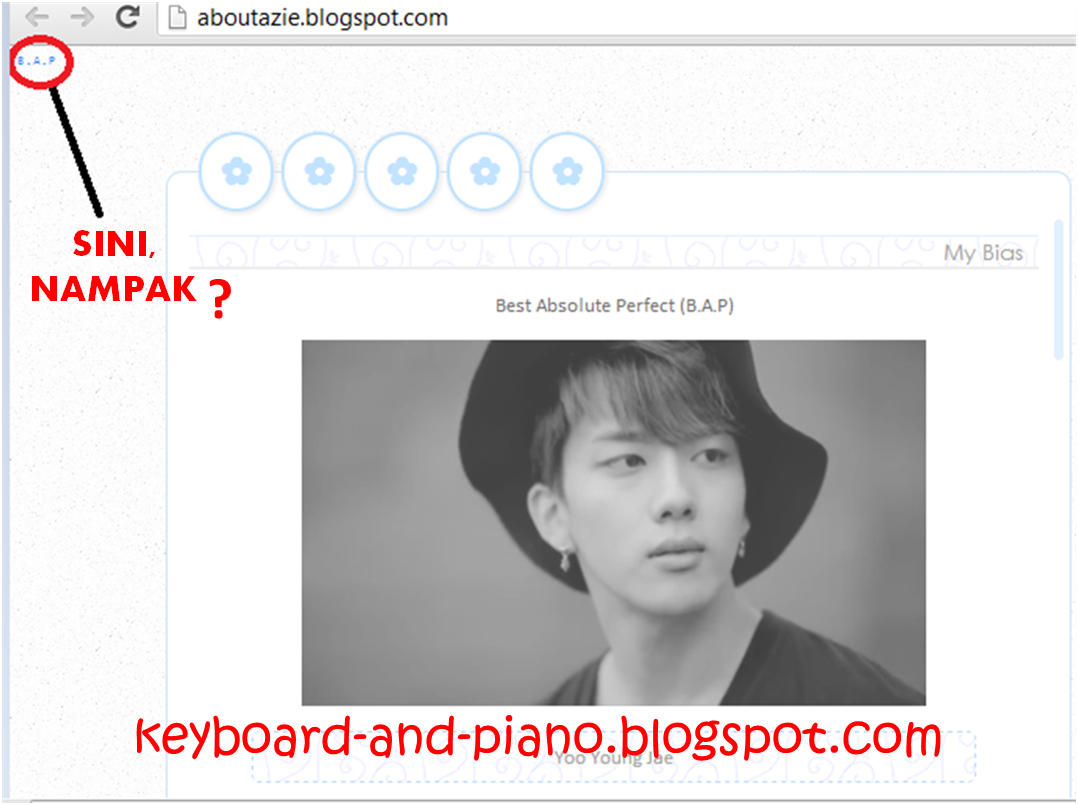 Click for enlargement
Okay, ikut ni,
Dashboard> templates
cari code </head>
pastu copy code kat bawah ni.
Pastu, pastekan kat bawah code </head> tadi.
RED: URL BLOG yang nak di credit kan
PINK: nama dia. just ubah nama azie tu
OREN: Tittle contoh ; credit, skins,
Preview and save.
kalau ada yang tak faham, boleh tanya aku. annyeong.
|